pyuncertainnumber
Submodules
- pyuncertainnumber.calibration
- pyuncertainnumber.characterisation
- pyuncertainnumber.console
- pyuncertainnumber.decorator
- pyuncertainnumber.gutils
- pyuncertainnumber.nlp
- pyuncertainnumber.opt
- pyuncertainnumber.pba
- pyuncertainnumber.propagation
- pyuncertainnumber.sensitivity
- pyuncertainnumber.surrogate
- pyuncertainnumber.validation
Attributes
Classes
Uncertain Number class |
|
Uncertain Number class |
|
a base class for Pbox |
|
distribution free p-box |
|
Interval is the main class |
|
Representation of the epistemic space which are indeed bounds of each dimension |
|
Class for Dempester-Shafer structures. |
|
Dependency class to specify copula models. |
|
a handy tuple of eCDF function q and p |
|
Interval is the main class |
|
distribution free p-box |
|
High-level integrated class for the propagation of uncertain numbers |
Functions
|
a shortcut to construct the interval-type UN object |
|
a shortcut to construct the distribution-type UN object |
|
a shortcut for the Dempster-Shafer-type UN object |
|
|
|
|
|
|
|
|
|
|
|
|
|
|
|
|
|
|
|
|
|
|
|
|
|
|
|
|
|
|
|
|
|
|
|
Construct a uncertain number given known statistical properties served as constraints. |
|
Equivalent to an interval object constructed as a nonparametric Pbox. |
|
Generates a distribution-free p-box based upon the minimum, maximum and mean of the variable |
|
Nonparametric pbox construction based on constraint of minimum and mean |
|
Generates a distribution-free p-box based upon the minimum, maximum, mean and standard deviation of the variable |
|
Generates a distribution-free p-box based upon the minimum, maximum, mean and standard deviation of the variable |
|
Nonparametric pbox construction based on constraint of mean and var |
|
Generates a distribution-free p-box based upon the minimum, maximum and median of the variable |
|
Nonparametric pbox construction based on constraint of mean and std |
|
Nonparametric pbox construction based on constraint of mean and var |
|
Generates a positive distribution-free p-box based upon the mean and standard deviation of the variable |
|
yields a distribution-free p-box based on specified percentiles of the variable |
|
construct free pbox from sample data by Kolmogorov-Smirnoff confidence bounds |
|
parametric estimator to fit a distribution from data |
|
parse an array-like structure into a vector interval |
|
top-level function that universally parses scalar and vector bounds |
|
This function casts an array-like structure into an Interval structure. |
|
interpret linguistic hedge words into UncertainNumber objects |
|
top-level call signature to infer a c-box given data and family, plus rarely additional kwargs |
|
top-level call for the next value predictive distribution |
|
construct free pbox from sample data by Kolmogorov-Smirnoff confidence bounds |
|
parse an array-like structure into a vector interval |
|
reweight the masses to sum to 1 |
|
compute the weighted ecdf from (precise) sample data |
|
Convert any input un into a Pbox object |
|
calculates the envelope of constructs only |
|
Returns the imposition/intersection of the list of p-boxes |
|
it could work for either Pbox, distribution, DS structure or Intervals |
|
stochastic mixture operation of Intervals with probability masses |
|
|
|
mixture operation for DS structure |
|
nonparametric envelope function directly from data samples |
|
nonparametric envelope function for separate empirical CDFs |
|
bespoke function used for am metric case |
|
bespoke function used for am metric case |
|
General implementation of interval propagation through a function: |
|
Performs uncertainty propagation using the Taylor expansion method. |
|
Interval Monte Carlo for propagation of pbox |
|
classic slicing algoritm for rigorous propagation of pbox |
|
Double-loop Monte Carlo or nested Monte Carlo for mixed uncertainty propagation |
|
Compute the area metric between two objects. |
|
Inspect the any type of uncertain number x. |
Package Contents
- pyuncertainnumber.__version__
- class pyuncertainnumber.UN(name=None, symbol=None, unit=None, uncertainty_type=None, essence=None, masses=None, intervals=None, distribution_parameters=None, pbox_parameters=None, hedge=None, _construct=None, nominal_value=1.0, p_flag=True, _skip_construct_init=False, measurand=None, nature=None, provenence=None, justification=None, structure=None, security=None, ensemble=None, variability=None, dependence=None, uncertainty=None, physical_quantity=None, _samples=None, **kwargs)
Uncertain Number class
- Parameters:
intervals (-) – the interval specification for the UN object;
distribution_parameters (-) – a list of the distribution family and its parameters; e.g. [‘norm’, [0, 1]];
pbox_initialisation (-) – a list of the distribution family and its parameters; e.g. [‘norm’, ([0,1], [3,4])];
Example
Uncertain numbers can be constructed in multiple ways. For example, a canonical way allows users to fill in as many fields as possible:
>>> from pyuncertainnumber import UncertainNumber
>>> UncertainNumber(name="velocity", symbol="v", unit="m/s", intervals=[1, 2])
>>> UncertainNumber(name="velocity", symbol="v", unit="m/s", distribution_parameters=['normal', (10, 2)])
>>> UncertainNumber(name="velocity", symbol="v", unit="m/s", pbox_parameters=['normal', ([8, 12], [0.5, 1.5])])
>>> UncertainNumber(name="velocity", symbol="v", unit="m/s", essence='dempster_shafer', intervals=[[1,5], [3,6]], masses=[0.5, 0.5])
Alternatively, users can use shortcuts to quickly create UN objects and get on with calculations:
>>> import pyuncertainnumber as pun
>>> pun.I([1, 2])
>>> pun.D('gaussian', (10, 2))
>>> pun.normal([8, 12], [0.5, 1.5])
>>> pun.DSS(intervals=[[1,5], [3,6]], masses=[0.5, 0.5])
- Q_
- instances = []
- name = None
- symbol = None
- uncertainty_type = None
- essence = None
- masses = None
- intervals = None
- distribution_parameters = None
- pbox_parameters = None
- hedge = None
- _construct = None
- nominal_value = 1.0
- p_flag = True
- _skip_construct_init = False
- measurand = None
- nature = None
- provenence = None
- justification = None
- structure = None
- security = None
- ensemble = None
- variability = None
- dependence = None
- uncertainty = None
- _physical_quantity = None
- _samples = None
- property unit
get the physical quantity of the uncertain number
- __init_check()
- __init_construct()
the de facto parameterisation/instantiation procedure for the core constructs of the UN class
- caveat:
user needs to by themselves figure out the correct shape of the ‘distribution_parameters’, such as [‘uniform’, [1,2]]
- parameterised_pbox_specification()
- _update_physical_quantity()
- static match_pbox(keyword, parameters)
match the distribution keyword from the initialisation to create the underlying distribution object
- Parameters:
keyword (-) – (str) the distribution keyword
parameters (-) – (list) the parameters of the distribution
- init_check()
check if the UN initialisation specification is correct
Note
a lot of things to double check. keep an growing list: 1. unit 2. hedge: user cannot speficy both ‘hedge’ and ‘intervals’. ‘intervals’ takes precedence.
- __str__()
string representation of the UncertainNumber
Note
the same as __reor__ for now until a better idea is proposed
- __repr__() str
Concise __repr__
- describe(style='verbose')
print out a verbose description of the uncertain number
- ci()
get 95% range confidence interval
- plot(**kwargs)
quick plot of the uncertain number object
- display(**kwargs)
quick plot of the uncertain number object
- property construct
- property construct_type
- property physical_quantity
get the physical quantity of the uncertain number
- classmethod from_hedge(hedged_language)
create an Uncertain Number from hedged language
- classmethod fromConstruct(construct)
create an Uncertain Number from a construct object
- classmethod fromDistribution(D, **kwargs)
create an Uncertain Number from a Distribution object.
- Parameters:
D (-) – a Distribution object
dist_family (str) – the distribution family
dist_params (list, tuple or string) – the distribution parameters
- classmethod from_Interval(u)
- classmethod from_pbox(p)
genenal from pbox
- classmethod from_ds(ds)
- classmethod from_sps(sps_dist)
create an UN object from a parametric scipy.stats dist object #! it seems that a function will suffice :param - sps_dist: scipy.stats dist object
Note
sps_dist –> UN.Distribution object
- __array_ufunc__(ufunc, method, *inputs, **kwargs)
- _apply(method)
- sqrt()
- exp()
- tanh()
- tan()
- log()
- sin()
- cos()
- reciprocal()
- bin_ops(other, ops)
- __add__(other)
add two uncertain numbers
- __radd__(other)
- __sub__(other)
- __mul__(other)
multiply two uncertain numbers
- __rmul__(other)
- __truediv__(other)
divide two uncertain numbers
- __rtruediv__(other)
- __pow__(other)
power of two uncertain numbers
- __rpow__(other)
power of two uncertain numbers
- add(other, dependency='f')
- sub(other, dependency='f')
- mul(other, dependency='f')
- div(other, dependency='f')
- pow(other, dependency='f')
- JSON_dump(filename='UN_data.json')
the JSON serialisation of the UN object into the filesystem
- to_pbox()
convert the UN object to a pbox object
- class pyuncertainnumber.UncertainNumber(name=None, symbol=None, unit=None, uncertainty_type=None, essence=None, masses=None, intervals=None, distribution_parameters=None, pbox_parameters=None, hedge=None, _construct=None, nominal_value=1.0, p_flag=True, _skip_construct_init=False, measurand=None, nature=None, provenence=None, justification=None, structure=None, security=None, ensemble=None, variability=None, dependence=None, uncertainty=None, physical_quantity=None, _samples=None, **kwargs)
Uncertain Number class
- Parameters:
intervals (-) – the interval specification for the UN object;
distribution_parameters (-) – a list of the distribution family and its parameters; e.g. [‘norm’, [0, 1]];
pbox_initialisation (-) – a list of the distribution family and its parameters; e.g. [‘norm’, ([0,1], [3,4])];
Example
Uncertain numbers can be constructed in multiple ways. For example, a canonical way allows users to fill in as many fields as possible:
>>> from pyuncertainnumber import UncertainNumber
>>> UncertainNumber(name="velocity", symbol="v", unit="m/s", intervals=[1, 2])
>>> UncertainNumber(name="velocity", symbol="v", unit="m/s", distribution_parameters=['normal', (10, 2)])
>>> UncertainNumber(name="velocity", symbol="v", unit="m/s", pbox_parameters=['normal', ([8, 12], [0.5, 1.5])])
>>> UncertainNumber(name="velocity", symbol="v", unit="m/s", essence='dempster_shafer', intervals=[[1,5], [3,6]], masses=[0.5, 0.5])
Alternatively, users can use shortcuts to quickly create UN objects and get on with calculations:
>>> import pyuncertainnumber as pun
>>> pun.I([1, 2])
>>> pun.D('gaussian', (10, 2))
>>> pun.normal([8, 12], [0.5, 1.5])
>>> pun.DSS(intervals=[[1,5], [3,6]], masses=[0.5, 0.5])
- Q_
- instances = []
- name = None
- symbol = None
- uncertainty_type = None
- essence = None
- masses = None
- intervals = None
- distribution_parameters = None
- pbox_parameters = None
- hedge = None
- _construct = None
- nominal_value = 1.0
- p_flag = True
- _skip_construct_init = False
- measurand = None
- nature = None
- provenence = None
- justification = None
- structure = None
- security = None
- ensemble = None
- variability = None
- dependence = None
- uncertainty = None
- _physical_quantity = None
- _samples = None
- property unit
get the physical quantity of the uncertain number
- __init_check()
- __init_construct()
the de facto parameterisation/instantiation procedure for the core constructs of the UN class
- caveat:
user needs to by themselves figure out the correct shape of the ‘distribution_parameters’, such as [‘uniform’, [1,2]]
- parameterised_pbox_specification()
- _update_physical_quantity()
- static match_pbox(keyword, parameters)
match the distribution keyword from the initialisation to create the underlying distribution object
- Parameters:
keyword (-) – (str) the distribution keyword
parameters (-) – (list) the parameters of the distribution
- init_check()
check if the UN initialisation specification is correct
Note
a lot of things to double check. keep an growing list: 1. unit 2. hedge: user cannot speficy both ‘hedge’ and ‘intervals’. ‘intervals’ takes precedence.
- __str__()
string representation of the UncertainNumber
Note
the same as __reor__ for now until a better idea is proposed
- __repr__() str
Concise __repr__
- describe(style='verbose')
print out a verbose description of the uncertain number
- ci()
get 95% range confidence interval
- plot(**kwargs)
quick plot of the uncertain number object
- display(**kwargs)
quick plot of the uncertain number object
- property construct
- property construct_type
- property physical_quantity
get the physical quantity of the uncertain number
- classmethod from_hedge(hedged_language)
create an Uncertain Number from hedged language
- classmethod fromConstruct(construct)
create an Uncertain Number from a construct object
- classmethod fromDistribution(D, **kwargs)
create an Uncertain Number from a Distribution object.
- Parameters:
D (-) – a Distribution object
dist_family (str) – the distribution family
dist_params (list, tuple or string) – the distribution parameters
- classmethod from_Interval(u)
- classmethod from_pbox(p)
genenal from pbox
- classmethod from_ds(ds)
- classmethod from_sps(sps_dist)
create an UN object from a parametric scipy.stats dist object #! it seems that a function will suffice :param - sps_dist: scipy.stats dist object
Note
sps_dist –> UN.Distribution object
- __array_ufunc__(ufunc, method, *inputs, **kwargs)
- _apply(method)
- sqrt()
- exp()
- tanh()
- tan()
- log()
- sin()
- cos()
- reciprocal()
- bin_ops(other, ops)
- __add__(other)
add two uncertain numbers
- __radd__(other)
- __sub__(other)
- __mul__(other)
multiply two uncertain numbers
- __rmul__(other)
- __truediv__(other)
divide two uncertain numbers
- __rtruediv__(other)
- __pow__(other)
power of two uncertain numbers
- __rpow__(other)
power of two uncertain numbers
- add(other, dependency='f')
- sub(other, dependency='f')
- mul(other, dependency='f')
- div(other, dependency='f')
- pow(other, dependency='f')
- JSON_dump(filename='UN_data.json')
the JSON serialisation of the UN object into the filesystem
- to_pbox()
convert the UN object to a pbox object
- pyuncertainnumber.I(*args: str | list[numbers.Number] | pyuncertainnumber.pba.intervals.number.Interval) UncertainNumber
a shortcut to construct the interval-type UN object
- pyuncertainnumber.D(*args, **kwargs) UncertainNumber
a shortcut to construct the distribution-type UN object
- pyuncertainnumber.DSS(*args, **kwargs) UncertainNumber
a shortcut for the Dempster-Shafer-type UN object
- pyuncertainnumber.norm(*args)
- pyuncertainnumber.gaussian(*args)
- pyuncertainnumber.gamma(*args)
- pyuncertainnumber.normal(*args)
- pyuncertainnumber.alpha(*args)
- pyuncertainnumber.anglit(*args)
- pyuncertainnumber.argus(*args)
- pyuncertainnumber.arcsine(*args)
- pyuncertainnumber.beta(*args)
- pyuncertainnumber.betaprime(*args)
- pyuncertainnumber.bradford(*args)
- pyuncertainnumber.burr(*args)
- pyuncertainnumber.burr12(*args)
- pyuncertainnumber.cauchy(*args)
- pyuncertainnumber.chi(*args)
- pyuncertainnumber.chi2(*args)
- pyuncertainnumber.cosine(*args)
- pyuncertainnumber.uniform
- pyuncertainnumber.lognormal
- pyuncertainnumber.known_properties(maximum=None, mean=None, median=None, minimum=None, mode=None, percentiles=None, std=None, var=None, family=None, **kwargs) pyuncertainnumber.characterisation.uncertainNumber.UncertainNumber
Construct a uncertain number given known statistical properties served as constraints.
- Parameters:
maximum (number) – maximum value of the variable
mean (number) – mean value of the variable
median (number) – median value of the variable
minimum (number) – minimum value of the variable
mode (number) – mode value of the variable
percentiles (dict) – dictionary of percentiles and their values, e.g. {0: 0, 0.1: 1, 0.5: 2, 0.9: pun.I(3,4), 1:5}
std (number) – standard deviation of the variable
var (number) – variance of the variable
family (str) – name of the distribution family, e.g. ‘normal’, ‘lognormal’, ‘uniform’, ‘triangular’, etc.
- Returns:
uncertain number
Note
It’s also possible to directly call a function given the known information, such as
pun.mean_std(mean=1, std=0.5).Example
>>> from pyuncertainnumber.pba import known_properties
>>> known_properties(
...     maximum = 2,
...     mean = 1,
...     var = 0.25,
...     minimum=0,
...     )
- pyuncertainnumber.known_constraints
- pyuncertainnumber.min_max(minimum: numbers.Number, maximum: numbers.Number) pyuncertainnumber.characterisation.uncertainNumber.UncertainNumber | pyuncertainnumber.pba.pbox_abc.Pbox
Equivalent to an interval object constructed as a nonparametric Pbox.
- Parameters:
minimum – Left end of box
maximum – Right end of box
- Returns:
UncertainNumber or Pbox
Tip
Two types of return values are possible:
by default, a UncertainNumber is returned;
For low-level controls, if return_construct=True is specified, a Pbox is returned.
Example
>>> from pyuncertainnumber.pba import min_max
>>> min_max(0, 2)  # return a UncertainNumber
>>> min_max(0, 2, return_construct=True)  # return a Pbox
- pyuncertainnumber.min_max_mean(minimum: numbers.Number, maximum: numbers.Number, mean: numbers.Number, steps: int = Params.steps) pyuncertainnumber.characterisation.uncertainNumber.UncertainNumber | pyuncertainnumber.pba.pbox_abc.Pbox
Generates a distribution-free p-box based upon the minimum, maximum and mean of the variable
- Parameters:
minimum (float) – minimum value of the variable
maximum (float) – maximum value of the variable
mean (float) – mean value of the variable
- Returns:
UncertainNumber or Pbox
Tip
Two types of return values are possible:
by default, a UncertainNumber is returned;
For low-level controls, if return_construct=True is specified, a Pbox is returned.
Example
>>> min_max_mean(0, 2, 1)
- pyuncertainnumber.min_mean(minimum, mean, steps=Params.steps) pyuncertainnumber.characterisation.uncertainNumber.UncertainNumber | pyuncertainnumber.pba.pbox_abc.Pbox
Nonparametric pbox construction based on constraint of minimum and mean
- Parameters:
minimum (number) – minimum value of the variable
mean (number) – mean value of the variable
- Returns:
UncertainNumber or Pbox
Tip
Two types of return values are possible:
by default, a UncertainNumber is returned;
For low-level controls, if return_construct=True is specified, a Pbox is returned.
Example
>>> from pyuncertainnumber.pba import min_mean
>>> min_mean(0, 1)  # return a UncertainNumber
>>> min_mean(0, 1, return_construct=True)  # return a Pbox
- pyuncertainnumber.min_max_mean_std(minimum: numbers.Number, maximum: numbers.Number, mean: numbers.Number, std: numbers.Number, **kwargs) pyuncertainnumber.characterisation.uncertainNumber.UncertainNumber | pyuncertainnumber.pba.pbox_abc.Pbox
Generates a distribution-free p-box based upon the minimum, maximum, mean and standard deviation of the variable
- Parameters:
maximum (number) – maximum value of the variable
minimum (number) – minimum value of the variable
std (number) – standard deviation of the variable
var (number) – variance of the variable
- Returns:
UncertainNumber or Pbox
Tip
Two types of return values are possible:
by default, a UncertainNumber is returned;
For low-level controls, if return_construct=True is specified, a Pbox is returned.
Example
>>> min_max_mean_std(0, 2, 1, 0.5) # return a UncertainNumber
See also
- pyuncertainnumber.min_max_mean_var(minimum: numbers.Number, maximum: numbers.Number, mean: numbers.Number, var: numbers.Number, **kwargs) pyuncertainnumber.characterisation.uncertainNumber.UncertainNumber | pyuncertainnumber.pba.pbox_abc.Pbox
Generates a distribution-free p-box based upon the minimum, maximum, mean and standard deviation of the variable
- Parameters:
minimum (number) – minimum value of the variable
maximum (number) – maximum value of the variable
mean (number) – mean value of the variable
var (number) – variance of the variable
Tip
Two types of return values are possible:
by default, a UncertainNumber is returned;
For low-level controls, if return_construct=True is specified, a Pbox is returned.
Example
>>> min_max_mean_var(0, 2, 1, 0.25) # return a UncertainNumber
Implementation
Equivalent to
min_max_mean_std(minimum,maximum,mean,np.sqrt(var))See also
- pyuncertainnumber.min_max_mode(minimum: numbers.Number, maximum: numbers.Number, mode: numbers.Number, steps: int = Params.steps) pyuncertainnumber.characterisation.uncertainNumber.UncertainNumber | pyuncertainnumber.pba.pbox_abc.Pbox
Nonparametric pbox construction based on constraint of mean and var
- Parameters:
minimum – minimum value of the variable
maximum – maximum value of the variable
mode (number) – mode value of the variable
- Returns:
UncertainNumber or Pbox
Tip
Two types of return values are possible:
by default, a UncertainNumber is returned;
For low-level controls, if return_construct=True is specified, a Pbox is returned.
Example
>>> min_max_mode(0, 2, 1) # return a UncertainNumber
- pyuncertainnumber.min_max_median(minimum: numbers.Number, maximum: numbers.Number, median: numbers.Number, steps: int = Params.steps) pyuncertainnumber.characterisation.uncertainNumber.UncertainNumber | pyuncertainnumber.pba.pbox_abc.Pbox
Generates a distribution-free p-box based upon the minimum, maximum and median of the variable
- Parameters:
minimum – minimum value of the variable
maximum – maximum value of the variable
median – median value of the variable
- Returns:
UncertainNumber or Pbox
Tip
Two types of return values are possible:
by default, a UncertainNumber is returned;
For low-level controls, if return_construct=True is specified, a Pbox is returned.
Example
>>> min_max_median(0, 2, 1) # return a UncertainNumber
- pyuncertainnumber.mean_std(mean: numbers.Number, std: numbers.Number, steps=Params.steps) pyuncertainnumber.characterisation.uncertainNumber.UncertainNumber | pyuncertainnumber.pba.pbox_abc.Pbox
Nonparametric pbox construction based on constraint of mean and std
- Parameters:
mean (number) – mean value of the variable
std (number) – std value of the variable
- Returns:
UncertainNumber or Pbox
Tip
Two types of return values are possible:
by default, a UncertainNumber is returned;
For low-level controls, if return_construct=True is specified, a Pbox is returned.
Example
>>> mean_std(1, 0.5)
- pyuncertainnumber.mean_var(mean: numbers.Number, var: numbers.Number) pyuncertainnumber.characterisation.uncertainNumber.UncertainNumber | pyuncertainnumber.pba.pbox_abc.Pbox
Nonparametric pbox construction based on constraint of mean and var
- Parameters:
mean (number) – mean value of the variable
vasr (number) – var value of the variable
- Returns:
UncertainNumber or Pbox
Tip
Two types of return values are possible:
by default, a UncertainNumber is returned;
For low-level controls, if return_construct=True is specified, a Pbox is returned.
Example
>>> mean_var(1, 0.25) # return a UncertainNumber
- pyuncertainnumber.pos_mean_std(mean: numbers.Number, std: numbers.Number, steps=Params.steps) pyuncertainnumber.pba.pbox_abc.Pbox
Generates a positive distribution-free p-box based upon the mean and standard deviation of the variable
- Parameters:
mean – mean of the variable
std – standard deviation of the variable
- Returns:
UncertainNumber or Pbox
Tip
Two types of return values are possible:
by default, a UncertainNumber is returned;
For low-level controls, if return_construct=True is specified, a Pbox is returned.
- pyuncertainnumber.from_percentiles(percentiles: dict, steps: int = Params.steps) pyuncertainnumber.characterisation.uncertainNumber.UncertainNumber | pyuncertainnumber.pba.pbox_abc.Pbox
yields a distribution-free p-box based on specified percentiles of the variable
- Parameters:
percentiles – dictionary of percentiles and their values (e.g. {0: 0, 0.1: 1, 0.5: 2, 0.9: I(3,4), 1:5})
steps – number of steps to use in the p-box
Note
The percentiles dictionary is of the form {percentile: value}. Where value can either be a number or an I. If value is a number, the percentile is assumed to be a point percentile. If value is an I, the percentile is assumed to be an interval percentile. If no keys for 0 and 1 are given,
-np.infandnp.infare used respectively. This will result in a p-box that is not bounded and raise a warning. If the percentiles are not increasing, the percentiles will be intersected. This may not be desired behaviour. ValueError: If any of the percentiles are not between 0 and 1.- Returns:
UncertainNumber or Pbox
Tip
Two types of return values are possible:
by default, a UncertainNumber is returned;
For low-level controls, if return_construct=True is specified, a Pbox is returned.
Example
>>> pba.from_percentiles(
>>>     {0: 0,
>>>     0.25: 0.5,
>>>     0.5: pba.I(1,2),
>>>     0.75: pba.I(1.5,2.5),
>>>     1: 3})
>>>     .display()
- pyuncertainnumber.KS_bounds(s: numpy.typing.ArrayLike, alpha: float, display=True, output_type='bounds') tuple[pyuncertainnumber.pba.ecdf.eCDF_bundle] | pyuncertainnumber.pba.pbox_abc.Pbox | pyuncertainnumber.UncertainNumber
construct free pbox from sample data by Kolmogorov-Smirnoff confidence bounds
- Parameters:
s (ArrayLike) – sample data, precise and imprecise
dn (float) – KS critical value at a significance level and sample size N;
output_type (str) – A choice between {‘bounds’, ‘pbox’, ‘un’}, default=’bounds’ which returns two eCDF bundles as bounds; ‘pbox’ to return a pbox object; ‘un’ to return an uncertain number object.
- Returns:
a tuple of two CDF bounds, i.e. upper and lower (eCDF_bundle objects), or a Pbox object, or an UncertainNumber object the return type is controlled by the output_type argument.
Note
By default the function returns two eCDF bundles as the extreme bounds. With the upper and lower bounds, a free pbox can be constructed.
Example
>>> # both precise data (e.g. numpy array) and imprecise data (e.g. a vector of interval) are supported
>>> precise_data = np.random.normal(0, 1, 100)  # precise data case
>>> ub, lb = pba.KS_bounds(precise_data, alpha=0.025, display=True)
>>> # alternatively, an uncertain number or a p-box can be returned
>>> pba.KS_bounds(precise_data, alpha=0.025, display=False, output_type='pbox')  # return a pbox object
>>> pba.KS_bounds(precise_data, alpha=0.025, display=False, output_type='un')  # return an uncertain number object
>>> # imprecise data case
>>> impre_data = pba.I(lo = precise_data -0.5, hi = precise_data + 0.5)
>>> ub, lb = pba.KS_bounds(impre_data, alpha=0.025, display=True)
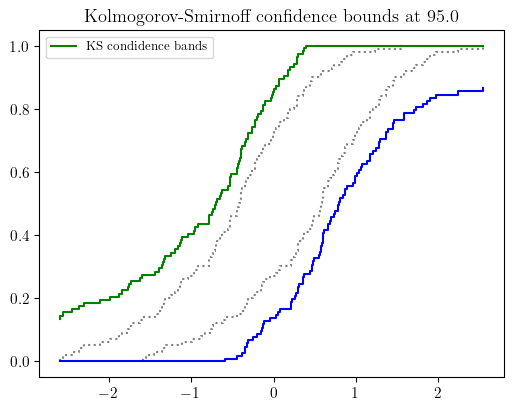
Kolmogorov-Smirnoff confidence bounds illustration with precise and imprecise data.
- pyuncertainnumber.fit(method: str, family: str, data: numpy.ndarray) pyuncertainnumber.UncertainNumber
parametric estimator to fit a distribution from data
- Parameters:
method (str) – method of fitting, e.g., {‘mle’ or ‘mom’} ‘entropy’, ‘pert’, ‘fermi’, ‘bayesian’
family (str) – distribution family to be fitted
data (np.ndarray) – data to be fitted
- Returns:
UncertainNumber object
Example
>>> # precise data
>>> pun.fit('mle', 'norm', np.random.normal(0, 1, 100))
>>>  # imprecise data
>>> precise_sample = sps.expon(scale=1/0.4).rvs(15)
>>> imprecise_data = pba.I(lo = precise_sample - 1.4, hi=precise_sample + 1.4)
>>> pun.fit('mom', family='exponential', data=imprecise_data)
See also
pyuncertainnumber.pba.KS_bounds(): a non-parametric charactearisation method using Kolmogorov-Smirnov bounds
- class pyuncertainnumber.Pbox(left: numpy.ndarray | list, right: numpy.ndarray | list, steps=Params.steps, mean=None, var=None, p_values=None)
Bases:
pyuncertainnumber.pba.mixins.NominalValueMixin,abc.ABCa base class for Pbox
Danger
this is an abstract class and should not be instantiated directly.
See also
pbox_abc.Staircaseandpbox_abc.Leaffor concrete implementations.- property left
- property right
- steps = 200
- mean = None
- var = None
- _pvalues
- abstractmethod _init_moments()
- _init_range()
- post_init_check()
- steps_check()
- _compute_nominal_value()
- degenerate_flag() bool
check if the pbox is degenerate (i.e. left == right everywhere)
- property degenerate: bool
- property p_values
- property range
- property lo
Returns the left-most value in the interval
- property hi
Returns the right-most value in the interval
- property support
- property median
- property enclosed_area
the enclosed area between the two extreme cdfs
- __iter__()
- __eq__(other)
Equality operator for Pbox objects
Note
two pboxes are equal if their left and right bounds are equal
- __contains__(item)
- to_interval()
discretise pbox into a vec-interval of length of default steps
Note
If desired a custom length of vec-interval as output, use discretise() method.
- to_dss(discretisation=Params.steps)
convert pbox to DempsterShafer object
- to_numpy()
convert pbox to a 2D numpy array (n, 2) of left and right
- class pyuncertainnumber.Staircase(left, right, steps=200, mean=None, var=None, p_values=None)
Bases:
Pboxdistribution free p-box
- _init_moments()
Initialize mean/var interval estimates.
- strategy:
Try LP-based bounds.
If that fails, try ECDF-based bounds.
If that also fails, set to NaN intervals so the program continues.
This function NEVER raises.
- __repr__()
- plot(title=None, ax=None, style='box', fill_color='lightgray', bound_colors=None, bound_styles=None, left_line_kwargs=None, right_line_kwargs=None, nuance='step', alpha=0.3, **kwargs)
default plotting function
- Parameters:
style (str) – ‘box’ or ‘simple’
fill_color (str) – color to fill the box (only for ‘box’ style)
bound_colors (list) – list of two colors for left and right bound lines
bound_styles (list) – list of two linestyles for left and right bound lines
left_line_kwargs (dict) – additional kwargs for left bound line
right_line_kwargs (dict) – additional kwargs for right bound line
nuance (str) – ‘step’ or ‘curve’ for bound line styles
alpha (float) – transparency level for the box fill (only for ‘box’ style)
**kwargs – additional keyword arguments for the plot
Note
Two styles are supported: a ‘box’ with fill-in color and a ‘simple’ one without fill-in color. Color and linestyle of the bound lines can be customized via the bound_styles, left_line_kwargs, and right_line_kwargs parameters. The argument nuance controls whether the bound lines are plotted as step functions (‘step’) or smooth curves (‘curve’).
Example
>>> a = pba.normal([2, 6], [0.5, 1])
>>> fig, ax = plt.subplots()
>>> a.plot(ax=ax, style='simple')  # simple style without fill-in color
>>> # box style with fill-in color and also customized bound colors
>>> a.plot(ax=ax, style='box',
...     fill_color='lightblue',
...     bound_colors = ['lightblue', 'lightblue'],
...     bound_styles=("--", ":"),
...     alpha=0.5
... )
>>> # customized left and right bound line styles
>>> ax = pbox.plot(
...     left_line_kwargs={"linestyle": "--", "linewidth": 2},
...     right_line_kwargs={"linestyle": ":", "linewidth": 2, "alpha": 0.8},
)
- plot_reverse_axis(title=None, ax=None, style='box', fill_color='lightgray', bound_colors=None, nuance='step', alpha=0.3, orientation='xy', invert_xaxis=True, **kwargs)
A testing plotting function that can swap quantile and probability axes.
- Parameters:
style (str) – ‘box’ or ‘simple’
orientation (str) – ‘xy’ keeps x on horizontal and Pr(X<=x) on vertical; ‘yx’ swaps them.
- plot_outside_legend(title=None, ax=None, style='box', fill_color='lightgray', bound_colors=None, nuance='step', alpha=0.3, **kwargs)
a specific variant of plot() which is used for scipy proceeding only.
- Parameters:
style (str) – ‘box’ or ‘simple’
- display(*args, **kwargs)
- plot_probability_bound(x: float, ax=None, linecolor='r', markercolor='r', **kwargs)
plot the probability bound at a certain quantile x
Note
a vertical line
- plot_quantile_bound(p: float, ax=None, **kwargs)
plot the quantile bound at a certain probability level p
Note
a horizontal line
- classmethod from_CDFbundle(a, b)
pbox from two emipirical CDF bundle
- Parameters:
a (-) – CDF bundle of lower extreme F;
b (-) – CDF bundle of upper extreme F;
- __neg__()
- __add__(other)
- __radd__(other)
- __sub__(other)
- __rsub__(other)
- __mul__(other)
- __rmul__(other)
- __truediv__(other)
- __rtruediv__(other)
- __pow__(other)
- __rpow__(other: numbers.Number)
Power operation with the base as other and self as the exponent
- __array_ufunc__(ufunc, method, *inputs, **kwargs)
- cdf(x: numpy.ndarray)
get the bounds on the cdf w.r.t x value
- Parameters:
x (array-like) – x values
- alpha_cut(alpha=0.5)
test the lightweight alpha_cut method
- Parameters:
alpha (array-like) – probability levels
- sample(n_sam)
LHS sampling by default
- precise_sample(n_a: int, theta: float = None, n_e: int = None)
Generate precise samples from a p-box
- discretise(n=None) pyuncertainnumber.Interval
alpha-cut discretisation of the p-box without outward rounding
- Parameters:
n (int) – number of steps to be used in the discretisation.
- Returns:
vector Interval
- outer_discretisation(n=None)
discretisation of a p-box to get intervals based on the scheme of outer approximation
- Parameters:
n (int) – number of steps to be used in the discretisation
Note
the_interval_list will have length one less than that of default p_values (i.e. 100 and 99)
- Returns:
the outer intervals in vec-Interval form
- condensation(n) Self
ourter condensation of the pbox to reduce the number of steps and get a sparser staircase pbox
- Parameters:
n (int) – number of steps to be used in the discretisation
Note
Have not thought about a better name so we call it condensation for now. Candidate names include ‘approximation’. It will ouput a p-box and keep steps as 200 for computational consistency.
Example
>>> p.condensation(n=5)
- Returns:
a staircase p-box that looks sparser but has the same number of steps
- condense(n) pyuncertainnumber.pba.dss.DempsterShafer
Another condensation function which has steps of n
Compared to the above condensation method that ouputs a p-box and keeps steps as 200 for computational consistency. This one condenses in a more literal manner, as in having n steps in the resulting Dempster-Shafer structure.
- truncate(a, b)
Truncate the Pbox to the range [a, b].
example: >>> from pyuncertainnumber import pba >>> p = pba.normal([4, 9], 1) >>> tr = p.truncate(3, 8) >>> fig, ax = plt.subplots() >>> p.plot(ax=ax) >>> tr.plot(ax=ax, fill_color=’r’) >>> plt.show()
- min(other, method='f')
Returns a new Pbox object that represents the element-wise minimum of two Pboxes.
- Parameters:
other (-) – Another Pbox object or a numeric value.
method (-) – Calculation method to determine the minimum. Can be one of ‘f’, ‘p’, ‘o’, ‘i’.
- Returns:
Pbox
- max(other, method='f')
- get_PI(alpha: numbers.Number = 0.95, style='narrowest') pyuncertainnumber.Interval
Compute the predictive interval at the coverage level of alpha
- Parameters:
alpha (Number) – coverage level for the predictive interval, default is 0.95
style (str) – ‘narrowest’ or ‘widest’, default is ‘narrowest’
Note
by default, narrowest predictive interval is returned; when the narrowest does not exist, a warning will the generated and then the widest is returned instead.
Example
>>> from pyuncertainnumber import pba
>>> p = pba.normal([10, 15, 1])
>>> p.get_PI(alpha=0.95, style='narrowest')
- straddles(N, endpoints=True) bool
Check whether the p-box straddles a number N
- Parameters:
N (float) – the Number to check
endpoints (Boolean) – Whether to include the endpoints within the check
- Returns:
- True
If \(\mathrm{left} \leq N \leq \mathrm{right}\) (Assuming endpoints=True)
- False
Otherwise
Note
This could affect the results of Frechet bounds
- straddles_zero() bool
Checks specifically whether \(0\) is within the p-box
- is_zero()
- is_nagative()
- imp(other)
Returns the imposition of self with other pbox
Note
binary imposition between two pboxes only
- _unary_template(f)
- exp()
exponential function: e^x
- sqrt()
square root function: √x
- reciprocal()
Calculate the reciprocal of the pbox
Note
the pbox should not straddle zero, otherwise a warning is raised
- log()
natural logarithm of the pbox
Note
the pbox must be positive
- sin()
- cos()
- tanh()
- add(other, dependency='f')
- sub(other, dependency='f')
- mul(other, dependency='f')
Multiplication of uncertain numbers with the defined dependency dependency
- div(other, dependency='f')
- pow(other, dependency='f')
Exponentiation of uncertain numbers with the defined dependency dependency
This suggests that the exponent (i.e. other) can also be an uncertain number.
- balchprod(other)
Frechet convolution of two pboxes when any of them straddles zero
- class pyuncertainnumber.Interval(lo: float | numpy.ndarray, hi: float | numpy.ndarray | None = None, do_heavy_checks: bool = True)
Bases:
pyuncertainnumber.pba.mixins.NominalValueMixinInterval is the main class
- _lo
- _hi = None
- run_heavy_checks()
Run heavy checks on the interval object
- __repr__()
- __str__()
- __len__()
- __iter__()
- __contains__(item)
Check if an item is enclosed within the interval.
Example
>>> i = Interval(1,3)
>>> 2 in i
True
>>> 4 in i
False
- __next__()
- __getitem__(i: int | slice)
- to_numpy() numpy.ndarray
transform interval objects to numpy arrays
- to_pbox()
- lhs_sample(n) numpy.ndarray
LHS sampling within the interval
- Parameters:
n – number of samples
- endpoints_lhs_sample(n) numpy.ndarray
LHS sampling within the interval plus the endpoints
- Parameters:
n – number of samples
- plot(ax=None, **kwargs)
- display()
- is_degenerate() bool
Check if the interval is degenerate (i.e., has zero width).
- _compute_nominal_value()
- ravel()
Return a flattened (1D) interval object for multi-dimensional intervals
Example
>>> A = np.random.rand(200, 200, 2)
>>> i = pba.intervalise(A)
>>> print(i.shape)
>>> i2 = i.ravel()
>>> print(i2.shape)
- property lo: numpy.ndarray | float
- property hi: numpy.ndarray | float
- property left
- property right
- property width
- property rad
half width
- property mid
- property unsized
- property val
seemingly equivalent to self.to_numpy()
- property scalar
Check if the interval is wide sense scalar
Note
wide sense: I(1,2) and I([1],[2]) are both scalars
- property is_scalar
Check if the interval is a strict-sense scalar
Note
strict sense: I(1,2) is a scalar, but I([1],[2]) is not
- property shape
- property ndim
- __neg__()
- __pos__()
- __add__(other)
- __radd__(left)
- __sub__(other)
- __rsub__(left)
- __mul__(other)
- __rmul__(left)
- __truediv__(other)
- __rtruediv__(left)
- __pow__(other)
- __lt__(other)
- __rlt__(left)
- __gt__(other)
- __rgt__(left)
- __le__(other)
- __rle__(left)
- __ge__(other)
- __rge__(left)
- __eq__(other)
- __ne__(other)
- __array_ufunc__(ufunc, method, *inputs, **kwargs)
- abs()
- sqrt()
- exp()
- log()
- sin()
- cos()
- tan()
- classmethod from_meanform(x, half_width)
- save_json(filename: str, comment: str = None, save_dir: str | pathlib.Path = '.') None
Save the interval object to a JSON5 file.
- Parameters:
filename (str) – The name of the file (without extension) to save the interval object to.
comment (str, optional) – A comment to include at the top of the file.
save_dir (str | Path, optional) – Directory where the file should be saved. Defaults to current directory.
Note
The file is saved with a .json5 extension.
Example
>>> a.save_json("interval_data", comment="This is interval data", save_dir="results/")
- pyuncertainnumber.make_vec_interval(vec)
parse an array-like structure into a vector interval
For most part, it works same to intervalise, except that this function can also handle a list of UN objects.
Example
>>> a, b = pba.I(1, 2), pba.I(3, 4)
>>> make_vec_interval([a, b])
Interval([1, 3], [2, 4])
- pyuncertainnumber.parse_bounds(b)
top-level function that universally parses scalar and vector bounds
- pyuncertainnumber.intervalise(x_: Any, interval_index=-1) pyuncertainnumber.pba.intervals.number.Interval | Any
This function casts an array-like structure into an Interval structure. All array-like structures will be first coerced into an ndarray of floats. If the coercion is unsuccessful the following error is thrown: ValueError: setting an array element with a sequence.
For example this is the expected behaviour: (*) an ndarray of shape (4,2) will be cast as an Interval of shape (4,).
(*) an ndarray of shape (7,3,2) will be cast as an Interval of shape (7,3).
(*) an ndarray of shape (3,2,7) will be cast as a degenerate Interval of shape (3,2,7).
(*) an ndarray of shape (2,3,7) will be cast as an Interval of shape (3,7).
(*) an ndarray of shape (2,3,7,2) will be cast as an Interval of shape (2,3,7) if interval_index is set to -1.
If an ndarray has shape with multiple dimensions having size 2, then the last dimension is intervalised. So, an ndarray of shape (7,2,2) will be cast as an Interval of shape (7,2) with the last dimension intervalised. When the ndarray has shape (2,2) again is the last dimension that gets intervalised.
In case of ambiguity, e.g. (2,5,2), now the first dimension can be forced to be intervalised, selecting index=0, default is -1.
It returns an interval only if the input is an array-like structure, otherwise it returns the following numpy error: ValueError: setting an array element with a sequence.
TODO: Parse a list of mixed numbers: interval and ndarrays.
- class pyuncertainnumber.EpistemicDomain(*vars: pyuncertainnumber.pba.intervals.Interval)
Representation of the epistemic space which are indeed bounds of each dimension
This class provides a set of handy functions to work with epistemic uncertainty in the form of bounds. It will be useful for tasks such as propagation or optimization where epistemic uncertainty is involved.
- Parameters:
vars – a set of Interval variables
Tip
Recommended to use for optimisation tasks where the design bounds can be quickly specified with the
toOptBounds()method.See also
pyuncertainnumber.src.pyuncertainnumber.opt.bo: Bayesian optimisation class.pyuncertainnumber.src.pyuncertainnumber.opt.ga: Genetic algorithm class.Example
>>> from pyuncertainnumber import pba
>>> e = EpistemicDomain(pba.I(-1, 3), pba.I(5, 9))
>>> # convert the epistemic space to bounds for the optimizer
>>> e.toOptBounds(method='GA')  # `varbound` for genetic algorithm
>>> e.toOptBounds(method='BO')  # `xc_bounds` for Bayesian optimisation
>>> # perform lhs sampling on the epistemic space
>>> sample = e.lhs_sampling(1000)
- lhs_sampling(n_samples: int)
perform lhs sampling on the epistemic space
- lhs_plus_endpoints(n_samples: int)
perform lhs sampling on the epistemic space and add endpoints
- bound_rep()
return the bounds (vec or matrix) of the epistemic space
- toOptBounds(method: str)
convert the epistemic space to bounds for the optimizer
- Parameters:
method (str) – the optimization method to use, e.g. ‘BayesOpt’, ‘GA’
- Returns:
the bounds of the design varibale used for the optimisation method
- to_GA_varBounds() numpy.ndarray
convert the epistemic space to bounds for the genetic algorithm optimizer
- to_BayesOptBounds(func_signature='vectorisation') dict
convert the epistemic space to bounds for the Bayesian optimisation optimizer
- pyuncertainnumber.hedge_interpret(hedge: str, return_type='interval') pyuncertainnumber.pba.intervals.Interval | pyuncertainnumber.pba.pbox_abc.Pbox
interpret linguistic hedge words into UncertainNumber objects
- Parameters:
hedge (str) – the hedge numerical expression to be interpreted
return_type (str) – the type of object to be returned, either ‘interval’ or ‘pbox’
Note
the return can either be an interval or a pbox object
Example
>>> hedge_interpret("about 200", return_type="pbox")
>>> hedge_interpret("200.00")
- pyuncertainnumber.infer_cbox(family: str, data, **args) pyuncertainnumber.pba.cbox_constructor.Cbox
top-level call signature to infer a c-box given data and family, plus rarely additional kwargs
Notes
data (list): a list of data samples, e.g. [2]
additina kwargs such as N for binomial family
Example
>>> infer_cbox('binomial', data=[2], N=10)
- pyuncertainnumber.infer_predictive_distribution(family: str, data, **args)
top-level call for the next value predictive distribution
- class pyuncertainnumber.DempsterShafer(intervals: pyuncertainnumber.pba.intervals.Interval | list[list] | list[pyuncertainnumber.pba.intervals.Interval] | numpy.ndarray, masses: numpy.typing.ArrayLike)
Bases:
pyuncertainnumber.pba.mixins.NominalValueMixin,pyuncertainnumber.pba.mixins._PboxOpsMixinClass for Dempester-Shafer structures.
- Parameters:
intervals – expect wildcard vector intervals, vec-Interval; list of scalar intervals; list of list pairs; or 2D array;
masses (ArrayLike) – probability masses
Example
>>> from pyuncertainnumber import pba
>>> dss = pba.DempsterShafer(intervals=[[1,5], [3,6]], masses=[0.5, 0.5])
>>> dss.structures
[dempstershafer_element(interval=[1.0,5.0], mass=0.5),
 dempstershafer_element(interval=[3.0,6.0], mass=0.5)]
Note
Dempster-Shafer structures are also called belief structures or evidence structures, and it can be converted to p-boxes.
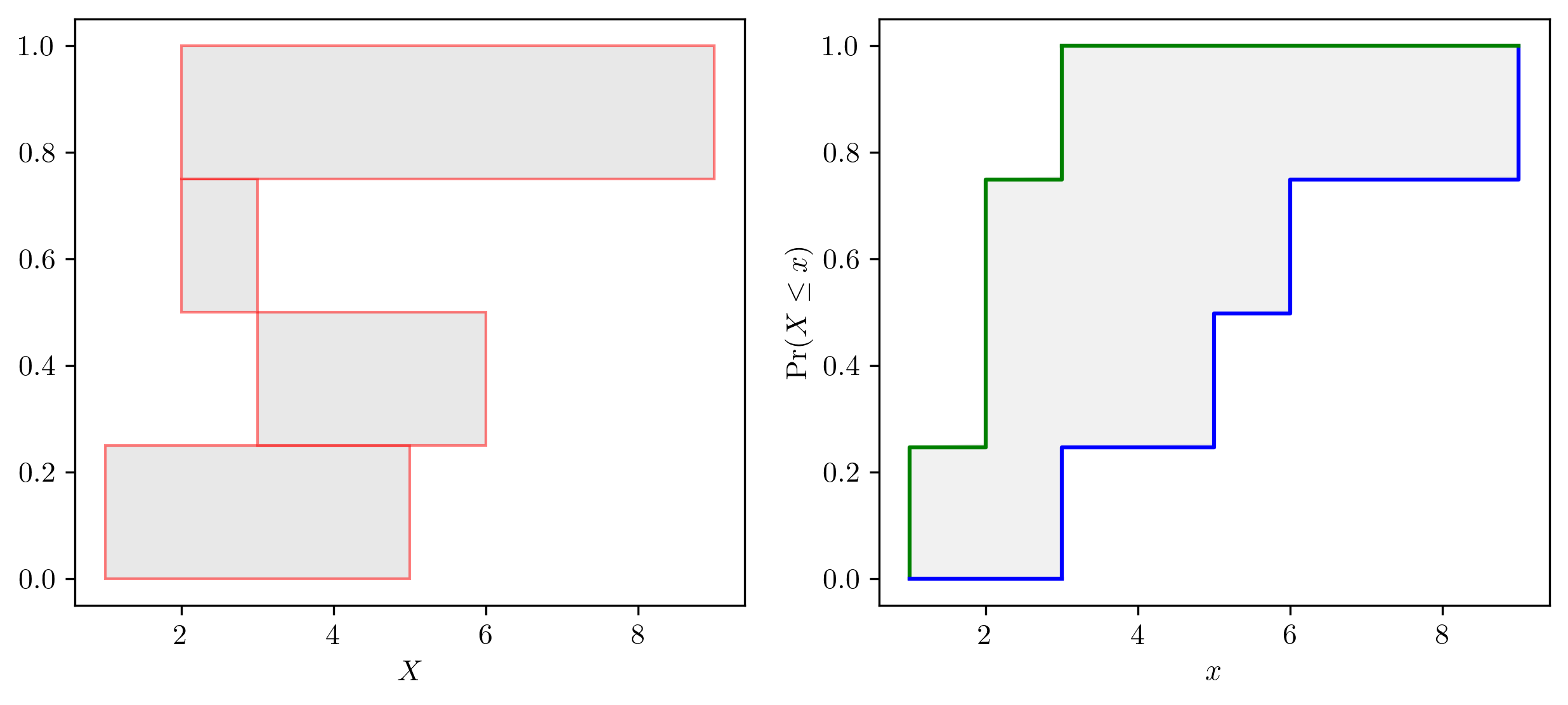
P-box and Dempster Shafer structure illustration.
- _intervals
- _masses
- _create_DSstructure()
- __repr__()
- _compute_nominal_value()
- property structures
- property intervals
Returns the Interval-typed focal elements of the Dempster-Shafer structure.
- property focal_elements
Returns the focal elements of the Dempster-Shafer structure.
- property masses
- plot(style='raw', ax=None, zorder=None, **kwargs)
for box type transform dss into a pbox and plot
- Parameters:
style (str) – “raw” (default), “box”, “pbox”, “interval”
edge_color (str) – edge color for raw style. If None, use default red color.
- display(style='box', ax=None, **kwargs)
- to_pbox()
- _to_pbox()
for mixin use only
- classmethod from_dsElements(*ds_elements: dempstershafer_element)
Create a Dempster-Shafer structure from a list of Dempster-Shafer elements.
- class pyuncertainnumber.Dependency(family: str, params: numbers.Number | None = None, **kwargs)
Dependency class to specify copula models.
- Parameters:
family (str) – Name of the copula family, one of “gaussian”, “t”, “frank”, “gumbel”, “clayton”, “independence”.
params (Number | None) – Backward-compatible single-parameter shortcut: - gaussian/t: interpreted as corr - frank/gumbel/clayton: interpreted as theta - independence: ignored
**kwargs – Any keyword parameters supported by the selected copula, e.g. corr=…, df=…, theta=…, k_dim=…, allow_singular=…
Examples
>>> Dependency("gaussian", params=0.8, k_dim=3)          # legacy style
>>> Dependency("gaussian", corr=0.8, k_dim=3)            # explicit
>>> Dependency("t", corr=0.6, df=5, k_dim=4)
>>> Dependency("frank", theta=2.5, k_dim=2)
>>> Dependency("independence", k_dim=5)
- copulas_dict
- _single_param_alias
- family = ''
- params = None
- _copula
- property copula
Access the underlying statsmodels copula instance.
- _post_init_check()
- __repr__()
- pdf(u)
- cdf(u)
- u_sample(n: int, random_state=None)
draws n samples in the U space (unit hypercube)
- display(style='3d_cdf', ax=None)
show the PDF or CDF in the u space
- fit(data)
- pyuncertainnumber.KS_bounds(s: numpy.typing.ArrayLike, alpha: float, display=True, output_type='bounds') tuple[pyuncertainnumber.pba.ecdf.eCDF_bundle] | pyuncertainnumber.pba.pbox_abc.Pbox | pyuncertainnumber.UncertainNumber
construct free pbox from sample data by Kolmogorov-Smirnoff confidence bounds
- Parameters:
s (ArrayLike) – sample data, precise and imprecise
dn (float) – KS critical value at a significance level and sample size N;
output_type (str) – A choice between {‘bounds’, ‘pbox’, ‘un’}, default=’bounds’ which returns two eCDF bundles as bounds; ‘pbox’ to return a pbox object; ‘un’ to return an uncertain number object.
- Returns:
a tuple of two CDF bounds, i.e. upper and lower (eCDF_bundle objects), or a Pbox object, or an UncertainNumber object the return type is controlled by the output_type argument.
Note
By default the function returns two eCDF bundles as the extreme bounds. With the upper and lower bounds, a free pbox can be constructed.
Example
>>> # both precise data (e.g. numpy array) and imprecise data (e.g. a vector of interval) are supported
>>> precise_data = np.random.normal(0, 1, 100)  # precise data case
>>> ub, lb = pba.KS_bounds(precise_data, alpha=0.025, display=True)
>>> # alternatively, an uncertain number or a p-box can be returned
>>> pba.KS_bounds(precise_data, alpha=0.025, display=False, output_type='pbox')  # return a pbox object
>>> pba.KS_bounds(precise_data, alpha=0.025, display=False, output_type='un')  # return an uncertain number object
>>> # imprecise data case
>>> impre_data = pba.I(lo = precise_data -0.5, hi = precise_data + 0.5)
>>> ub, lb = pba.KS_bounds(impre_data, alpha=0.025, display=True)
Kolmogorov-Smirnoff confidence bounds illustration with precise and imprecise data.
- pyuncertainnumber.make_vec_interval(vec)
parse an array-like structure into a vector interval
For most part, it works same to intervalise, except that this function can also handle a list of UN objects.
Example
>>> a, b = pba.I(1, 2), pba.I(3, 4)
>>> make_vec_interval([a, b])
Interval([1, 3], [2, 4])
- pyuncertainnumber.reweighting(*masses)
reweight the masses to sum to 1
- class pyuncertainnumber.eCDF_bundle
a handy tuple of eCDF function q and p
- quantiles: numpy.ndarray
- probabilities: numpy.ndarray
- __repr__()
- classmethod from_sps_ecdf(e)
utility to tranform sps.ecdf to eCDF_bundle
- plot_bounds(other)
plot the lower and upper bounds
- pyuncertainnumber.get_ecdf(s, w=None, display=False) tuple
compute the weighted ecdf from (precise) sample data
- Parameters:
s (array-like) – 1 dimensional precise sample data
w (array-like) – weights
Note
Sudret eq.1
- Returns:
ecdf in the form of a tuple of q and p
- class pyuncertainnumber.Interval(lo: float | numpy.ndarray, hi: float | numpy.ndarray | None = None, do_heavy_checks: bool = True)
Bases:
pyuncertainnumber.pba.mixins.NominalValueMixinInterval is the main class
- _lo
- _hi = None
- run_heavy_checks()
Run heavy checks on the interval object
- __repr__()
- __str__()
- __len__()
- __iter__()
- __contains__(item)
Check if an item is enclosed within the interval.
Example
>>> i = Interval(1,3)
>>> 2 in i
True
>>> 4 in i
False
- __next__()
- __getitem__(i: int | slice)
- to_numpy() numpy.ndarray
transform interval objects to numpy arrays
- to_pbox()
- lhs_sample(n) numpy.ndarray
LHS sampling within the interval
- Parameters:
n – number of samples
- endpoints_lhs_sample(n) numpy.ndarray
LHS sampling within the interval plus the endpoints
- Parameters:
n – number of samples
- plot(ax=None, **kwargs)
- display()
- is_degenerate() bool
Check if the interval is degenerate (i.e., has zero width).
- _compute_nominal_value()
- ravel()
Return a flattened (1D) interval object for multi-dimensional intervals
Example
>>> A = np.random.rand(200, 200, 2)
>>> i = pba.intervalise(A)
>>> print(i.shape)
>>> i2 = i.ravel()
>>> print(i2.shape)
- property lo: numpy.ndarray | float
- property hi: numpy.ndarray | float
- property left
- property right
- property width
- property rad
half width
- property mid
- property unsized
- property val
seemingly equivalent to self.to_numpy()
- property scalar
Check if the interval is wide sense scalar
Note
wide sense: I(1,2) and I([1],[2]) are both scalars
- property is_scalar
Check if the interval is a strict-sense scalar
Note
strict sense: I(1,2) is a scalar, but I([1],[2]) is not
- property shape
- property ndim
- __neg__()
- __pos__()
- __add__(other)
- __radd__(left)
- __sub__(other)
- __rsub__(left)
- __mul__(other)
- __rmul__(left)
- __truediv__(other)
- __rtruediv__(left)
- __pow__(other)
- __lt__(other)
- __rlt__(left)
- __gt__(other)
- __rgt__(left)
- __le__(other)
- __rle__(left)
- __ge__(other)
- __rge__(left)
- __eq__(other)
- __ne__(other)
- __array_ufunc__(ufunc, method, *inputs, **kwargs)
- abs()
- sqrt()
- exp()
- log()
- sin()
- cos()
- tan()
- classmethod from_meanform(x, half_width)
- save_json(filename: str, comment: str = None, save_dir: str | pathlib.Path = '.') None
Save the interval object to a JSON5 file.
- Parameters:
filename (str) – The name of the file (without extension) to save the interval object to.
comment (str, optional) – A comment to include at the top of the file.
save_dir (str | Path, optional) – Directory where the file should be saved. Defaults to current directory.
Note
The file is saved with a .json5 extension.
Example
>>> a.save_json("interval_data", comment="This is interval data", save_dir="results/")
- class pyuncertainnumber.Staircase(left, right, steps=200, mean=None, var=None, p_values=None)
Bases:
Pboxdistribution free p-box
- _init_moments()
Initialize mean/var interval estimates.
- strategy:
Try LP-based bounds.
If that fails, try ECDF-based bounds.
If that also fails, set to NaN intervals so the program continues.
This function NEVER raises.
- __repr__()
- plot(title=None, ax=None, style='box', fill_color='lightgray', bound_colors=None, bound_styles=None, left_line_kwargs=None, right_line_kwargs=None, nuance='step', alpha=0.3, **kwargs)
default plotting function
- Parameters:
style (str) – ‘box’ or ‘simple’
fill_color (str) – color to fill the box (only for ‘box’ style)
bound_colors (list) – list of two colors for left and right bound lines
bound_styles (list) – list of two linestyles for left and right bound lines
left_line_kwargs (dict) – additional kwargs for left bound line
right_line_kwargs (dict) – additional kwargs for right bound line
nuance (str) – ‘step’ or ‘curve’ for bound line styles
alpha (float) – transparency level for the box fill (only for ‘box’ style)
**kwargs – additional keyword arguments for the plot
Note
Two styles are supported: a ‘box’ with fill-in color and a ‘simple’ one without fill-in color. Color and linestyle of the bound lines can be customized via the bound_styles, left_line_kwargs, and right_line_kwargs parameters. The argument nuance controls whether the bound lines are plotted as step functions (‘step’) or smooth curves (‘curve’).
Example
>>> a = pba.normal([2, 6], [0.5, 1])
>>> fig, ax = plt.subplots()
>>> a.plot(ax=ax, style='simple')  # simple style without fill-in color
>>> # box style with fill-in color and also customized bound colors
>>> a.plot(ax=ax, style='box',
...     fill_color='lightblue',
...     bound_colors = ['lightblue', 'lightblue'],
...     bound_styles=("--", ":"),
...     alpha=0.5
... )
>>> # customized left and right bound line styles
>>> ax = pbox.plot(
...     left_line_kwargs={"linestyle": "--", "linewidth": 2},
...     right_line_kwargs={"linestyle": ":", "linewidth": 2, "alpha": 0.8},
)
- plot_reverse_axis(title=None, ax=None, style='box', fill_color='lightgray', bound_colors=None, nuance='step', alpha=0.3, orientation='xy', invert_xaxis=True, **kwargs)
A testing plotting function that can swap quantile and probability axes.
- Parameters:
style (str) – ‘box’ or ‘simple’
orientation (str) – ‘xy’ keeps x on horizontal and Pr(X<=x) on vertical; ‘yx’ swaps them.
- plot_outside_legend(title=None, ax=None, style='box', fill_color='lightgray', bound_colors=None, nuance='step', alpha=0.3, **kwargs)
a specific variant of plot() which is used for scipy proceeding only.
- Parameters:
style (str) – ‘box’ or ‘simple’
- display(*args, **kwargs)
- plot_probability_bound(x: float, ax=None, linecolor='r', markercolor='r', **kwargs)
plot the probability bound at a certain quantile x
Note
a vertical line
- plot_quantile_bound(p: float, ax=None, **kwargs)
plot the quantile bound at a certain probability level p
Note
a horizontal line
- classmethod from_CDFbundle(a, b)
pbox from two emipirical CDF bundle
- Parameters:
a (-) – CDF bundle of lower extreme F;
b (-) – CDF bundle of upper extreme F;
- __neg__()
- __add__(other)
- __radd__(other)
- __sub__(other)
- __rsub__(other)
- __mul__(other)
- __rmul__(other)
- __truediv__(other)
- __rtruediv__(other)
- __pow__(other)
- __rpow__(other: numbers.Number)
Power operation with the base as other and self as the exponent
- __array_ufunc__(ufunc, method, *inputs, **kwargs)
- cdf(x: numpy.ndarray)
get the bounds on the cdf w.r.t x value
- Parameters:
x (array-like) – x values
- alpha_cut(alpha=0.5)
test the lightweight alpha_cut method
- Parameters:
alpha (array-like) – probability levels
- sample(n_sam)
LHS sampling by default
- precise_sample(n_a: int, theta: float = None, n_e: int = None)
Generate precise samples from a p-box
- discretise(n=None) pyuncertainnumber.Interval
alpha-cut discretisation of the p-box without outward rounding
- Parameters:
n (int) – number of steps to be used in the discretisation.
- Returns:
vector Interval
- outer_discretisation(n=None)
discretisation of a p-box to get intervals based on the scheme of outer approximation
- Parameters:
n (int) – number of steps to be used in the discretisation
Note
the_interval_list will have length one less than that of default p_values (i.e. 100 and 99)
- Returns:
the outer intervals in vec-Interval form
- condensation(n) Self
ourter condensation of the pbox to reduce the number of steps and get a sparser staircase pbox
- Parameters:
n (int) – number of steps to be used in the discretisation
Note
Have not thought about a better name so we call it condensation for now. Candidate names include ‘approximation’. It will ouput a p-box and keep steps as 200 for computational consistency.
Example
>>> p.condensation(n=5)
- Returns:
a staircase p-box that looks sparser but has the same number of steps
- condense(n) pyuncertainnumber.pba.dss.DempsterShafer
Another condensation function which has steps of n
Compared to the above condensation method that ouputs a p-box and keeps steps as 200 for computational consistency. This one condenses in a more literal manner, as in having n steps in the resulting Dempster-Shafer structure.
- truncate(a, b)
Truncate the Pbox to the range [a, b].
example: >>> from pyuncertainnumber import pba >>> p = pba.normal([4, 9], 1) >>> tr = p.truncate(3, 8) >>> fig, ax = plt.subplots() >>> p.plot(ax=ax) >>> tr.plot(ax=ax, fill_color=’r’) >>> plt.show()
- min(other, method='f')
Returns a new Pbox object that represents the element-wise minimum of two Pboxes.
- Parameters:
other (-) – Another Pbox object or a numeric value.
method (-) – Calculation method to determine the minimum. Can be one of ‘f’, ‘p’, ‘o’, ‘i’.
- Returns:
Pbox
- max(other, method='f')
- get_PI(alpha: numbers.Number = 0.95, style='narrowest') pyuncertainnumber.Interval
Compute the predictive interval at the coverage level of alpha
- Parameters:
alpha (Number) – coverage level for the predictive interval, default is 0.95
style (str) – ‘narrowest’ or ‘widest’, default is ‘narrowest’
Note
by default, narrowest predictive interval is returned; when the narrowest does not exist, a warning will the generated and then the widest is returned instead.
Example
>>> from pyuncertainnumber import pba
>>> p = pba.normal([10, 15, 1])
>>> p.get_PI(alpha=0.95, style='narrowest')
- straddles(N, endpoints=True) bool
Check whether the p-box straddles a number N
- Parameters:
N (float) – the Number to check
endpoints (Boolean) – Whether to include the endpoints within the check
- Returns:
- True
If \(\mathrm{left} \leq N \leq \mathrm{right}\) (Assuming endpoints=True)
- False
Otherwise
Note
This could affect the results of Frechet bounds
- straddles_zero() bool
Checks specifically whether \(0\) is within the p-box
- is_zero()
- is_nagative()
- imp(other)
Returns the imposition of self with other pbox
Note
binary imposition between two pboxes only
- _unary_template(f)
- exp()
exponential function: e^x
- sqrt()
square root function: √x
- reciprocal()
Calculate the reciprocal of the pbox
Note
the pbox should not straddle zero, otherwise a warning is raised
- log()
natural logarithm of the pbox
Note
the pbox must be positive
- sin()
- cos()
- tanh()
- add(other, dependency='f')
- sub(other, dependency='f')
- mul(other, dependency='f')
Multiplication of uncertain numbers with the defined dependency dependency
- div(other, dependency='f')
- pow(other, dependency='f')
Exponentiation of uncertain numbers with the defined dependency dependency
This suggests that the exponent (i.e. other) can also be an uncertain number.
- balchprod(other)
Frechet convolution of two pboxes when any of them straddles zero
- pyuncertainnumber.convert(un)
Convert any input un into a Pbox object
Note
theorically ‘un’ can be {Interval, DempsterShafer, Distribution, float, int}
- class pyuncertainnumber.Params
- steps = 200
- many = 2000
- p_lboundary = 0.001
- p_hboundary = 0.999
- p_values
- scott_hedged_interpretation
- user_hedged_interpretation
- pyuncertainnumber.envelope(*l_uns: pyuncertainnumber.pba.pbox_abc.Pbox | pyuncertainnumber.pba.dss.DempsterShafer | numbers.Number | pyuncertainnumber.pba.intervals.Interval | pyuncertainnumber.pba.distributions.Distribution | pyuncertainnumber.characterisation.uncertainNumber.UncertainNumber, output_type='pbox') pyuncertainnumber.pba.pbox_abc.Staircase | pyuncertainnumber.characterisation.uncertainNumber.UncertainNumber
calculates the envelope of constructs only
- Parameters:
l_uns (list) – the components, constructs and uncertain numbers, on which the envelope operation applied on.
output_type (str) – {‘pbox’ or ‘uncertain_number’ or ‘un’} - default is pbox
- Returns:
the envelope of the given arguments, either a p-box or an interval.
Example
>>> from pyuncertainnumber import envelope
>>> a = pba.normal(3, 1)
>>> b = pba.uniform(5, 8)
>>> c = pba.normal(13, 2)
>>> t = envelope(a, b, c, output_type='pbox') # or output_type='uncertain_number'
- pyuncertainnumber.imposition(*l_uns: pyuncertainnumber.pba.pbox_abc.Pbox | pyuncertainnumber.pba.dss.DempsterShafer | numbers.Number | pyuncertainnumber.pba.intervals.Interval | pyuncertainnumber.pba.distributions.Distribution | pyuncertainnumber.characterisation.uncertainNumber.UncertainNumber, output_type='pbox') pyuncertainnumber.pba.pbox_abc.Staircase | pyuncertainnumber.characterisation.uncertainNumber.UncertainNumber
Returns the imposition/intersection of the list of p-boxes
- Parameters:
l_uns (list) – a list of constructs or UN objects to be mixed
output_type (str) – {‘pbox’ or ‘uncertain_number’ or ‘un’} - default is pbox
- Returns:
Pbox or UncertainNumber
Example
>>> import pyuncertainnumber as pun
>>> from pyuncertainnumber import pba
>>> a = pba.normal([3, 7], 1)
>>> b = pba.uniform([3,5], [6,9])
>>> i = pun.imposition(a, b)
- pyuncertainnumber.stochastic_mixture(*l_uns: pyuncertainnumber.pba.pbox_abc.Pbox | pyuncertainnumber.pba.dss.DempsterShafer | numbers.Number | pyuncertainnumber.pba.intervals.Interval | pyuncertainnumber.pba.distributions.Distribution | pyuncertainnumber.characterisation.uncertainNumber.UncertainNumber, weights=None)
it could work for either Pbox, distribution, DS structure or Intervals
- Parameters:
l_uns (-) – list of constructs or uncertain numbers
weights (-) – list of weights
Example
>>> import pyuncertainnumber as pun
>>> p = pun.stochastic_mixture([[1,3], [2,4]])
- pyuncertainnumber.stacking(vec_interval: pyuncertainnumber.pba.intervals.Interval | list[pyuncertainnumber.pba.intervals.Interval], *, weights=None, display=False, ax=None, return_type='pbox', **kwargs) pyuncertainnumber.pba.pbox_abc.Pbox
stochastic mixture operation of Intervals with probability masses
- Parameters:
vec_interval (-) – list of Intervals or a vectorised Interval
weights (-) – list of weights
display (-) – boolean for plotting
return_type (-) – {‘pbox’ or ‘ds’ or ‘bounds’}
- Returns:
by default a p-box but can return the left and right bound F in eCDF_bundlebounds.
Note
For intervals specifically.
it takes a list of intervals or a single vectorised interval, which is
a different signature compared to the other aggregation functions. - together the interval and masses, it can be deemed that all the inputs required is jointly a DS structure
Example
>>> stacking([[1,3], [2,4]], weights=[0.5, 0.5], display=True)
- pyuncertainnumber.mixture_pbox(*l_pboxes, weights=None, display=False) pyuncertainnumber.pba.pbox_abc.Pbox
- pyuncertainnumber.mixture_ds(*l_ds, display=False) pyuncertainnumber.pba.dss.DempsterShafer
mixture operation for DS structure
- pyuncertainnumber.env_samples(data: numpy.typing.ArrayLike, output_type='pbox', ecdf_choice='canonical')
nonparametric envelope function directly from data samples
- Parameters:
data (ArrayLike) – Each row represents a distribution, on which the envelope operation applied.
output_type (str) – {‘pbox’ or ‘cdf’} default is pbox cdf is the CDF bundle
ecdf_choice (str) – {‘canonical’ or ‘staircase’}
Note
envelope on a set of empirical CDFs
- pyuncertainnumber.env_ecdf_sep(*ecdfs, output_type='pbox', ecdf_choice='canonical')
nonparametric envelope function for separate empirical CDFs
- pyuncertainnumber.env_am(n_pars: numpy.typing.ArrayLike) numpy.ndarray
bespoke function used for am metric case
- Parameters:
n_pars (ArrayLike) – (n_sam, 2) of tuple (mu, sigma) which may be a tensor
- pyuncertainnumber.env_pbox_am(n_mean: numpy.typing.ArrayLike, n_std: numpy.typing.ArrayLike) numpy.ndarray
bespoke function used for am metric case
- Parameters:
n_mean (ArrayLike) – (n_sam,) of mean values which may be a tensor
n_std (ArrayLike) – (n_sam,) of standard deviation values which may be a tensor
- pyuncertainnumber.b2b(vars: pyuncertainnumber.pba.intervals.number.Interval | list[pyuncertainnumber.pba.intervals.number.Interval], func: callable, interval_strategy: str = None, subinterval_style: str = None, n_sub: int = None, n_sam: int = 200, **kwargs) pyuncertainnumber.pba.intervals.number.Interval
General implementation of interval propagation through a function:
\[Y = g(I_{x1}, I_{x2}, ..., I_{xn})\]where \(I_{x1}, I_{x2}, ..., I_{xn}\) are intervals.
In a general case, the function \(g\) is not necessarily monotonic and \(g\) may be a black-box model. Optimisation to the rescue and two of them particularly: Genetic Algorithm and Bayesian Optimisation.
- Parameters:
vars (Interval | list[Interval]) – a vector Interval or a list or tuple of scalar Intervals, or an EpistemicDomain object, or a scalar Interval;
func (callable) – performance or response function or a black-box model as in subprocess. Expect 2D inputs therefore func shall have the matrix signature. See Notes for additional details.
interval_strategy (str) –
the interval_strategy used for interval propagation. The choice shall be compatible with the response function signature. Seethe notes below for additional details.
’endpoints’: only the endpoints
’ga’: genetic algorithm
’bo’: bayesian optimisation
’direct’: directly apply function to the input intervals (the default)
’subinterval’: apply function to subintervals
’cauchy_deviate’: use the Cauchy Deviate Method for interval propagation
subinterval_style (str) – the subinterval_style only used for subinterval propagation, including {‘’direct’’, ‘’endpoints’’}.
n_sub (int) – number of subintervals, only used for subinterval propagation.
n_sam (int) – number of samples, only used for Cauchy deviate method
**kwargs – additional keyword arguments to be passed to the function, which provides extra control for the algorithm used. For example, for GA, one can pass in ‘algorithm_param’ for BO, one can pass in ‘acquisition_function’, ‘num_iterations’ etc. Typically, one would try the optimisation harder (e.g. more iterations) for a more accurate result.
Tip
This serves as a top-level for generic interval propagation .
Caution
interval_strategysuggests the method of interval propagation (e.g. ‘direct’ or ‘endpoints’, or ‘subinterval’, or ‘ga’, or ‘bo’), whhilesubinterval_styleis only used for ‘subinterval’ propagation. This is to say that what strategy (whether ‘direct’ or ‘endpoints’) will be further chosen for the sub-intervals. For scalar function propagation,varsshuld just be a scalar Interval object rather than a list.Danger
There are some subtleties about the calling signature of the propagating function. For
endpointsstrategy/subinterval_style, the function func should have a vectorised signature as it is expecting a 2D numpy array, whereas for thedirectstrategy/subinterval_style, it is expecting to take individual scalar inputs. It is recommended to write a function which implements both signature, as seen in the example below.- Returns:
the low and upper bound of the response
- Return type:
Example
>>> from pyuncertainnumber import b2b
>>> import numpy as np
>>> import pyuncertainnumber as pba
>>> # Define a universal function that handles a performance function with both `vectorised` and `iterable` signatures
>>> def bar_universal(x):
...     if isinstance(x, np.ndarray):  # foo_vectorised signature
...         if x.ndim == 1:
...             x = x[None, :]
...         return x[:, 0] ** 3 + x[:, 1] + 5
...     else:
...         return x[0] ** 3 + x[1] + 5  # foo_iterable signature
>>> # Define input intervals
>>> a = pba.I(3., 5.)
>>> b = pba.I(6., 26.)
>>> # using the {'endpoints', "direct", ga", "bo"} strategy
>>> b2b(vars=[a, b],
...     func=bar_universal,
...     interval_strategy='endpoints')  # replace with {"direct", ga", "bo"}
>>> # using the 'subinterval' strategy
>>> b2b(vars=[a, b],
...     func=bar_universal,
...     interval_strategy='subinterval',
...     subinterval_style='endpoints',
...     n_sub=2)
>>> # using the 'cauchy_deviate' strategy
>>> b2b(vars=[a, b],
...     func=bar_universal,
...     interval_strategy='cauchy_deviate',
...     n_sam=1000)
>>> # in comparison, one can compare with the result of interval arithmetic
>>> def bar_individual(x1, x2):
...     return x1 ** 3 + x2 + 5  # individual signature
>>> bar_individual(a, b)
[38.0, 156.0]
- class pyuncertainnumber.Propagation(vars: list[pyuncertainnumber.characterisation.uncertainNumber.UncertainNumber], func: callable, method: str, dependency: str | pyuncertainnumber.pba.dependency.Dependency = None, interval_strategy: str = None)
High-level integrated class for the propagation of uncertain numbers
- Parameters:
vars (UncertainNumber) – a list of uncertain numbers objects
func (Callable) – the response or performance function applied to the uncertain numbers
method (str) – a string indicating the method to be used for propagation (e.g. “monte_carlo”, “endpoint”, etc.) which may depend on the constructs of the uncertain numbers. See notes about function signature.
dependency (string or Dependency) – a Dependency object(i.e. a copula function) to model the dependency structure among input variables. Strings such as “independence” accepted for independence.
interval_strategy (str) – a strategy for interval propagation, including {‘direct’, ‘subinterval’, ‘endpoints’} which will affect the function signature of the response function. See notes about function signature.
Caution
This class supports with high-level computation with UncertainNumber objects.
Note
Discussion of the methods and strategies. When choosing
interval_strategy, “direct” requires function signature to take a list of inputs, whereas “subinterval” and “endpoints” require the function to take a vectorised signature.Warning
The computation cost increases exponentially with the number of input variables and the number of slices. Be cautious with the choice of number of slices
n_slicesgiven the number of input variablesvarsof the response function.Example
>>> import pyuncertainnumber as pun
>>> # construction of uncertain number objects
>>> a = pun.I(2, 3)
>>> b = pun.normal(4, 1)
>>> c = pun.uniform([4,5], [9,10])
>>> # vectorised function signature with matrix input (2D np.ndarray)
>>> def foo_vec(x): return x[:, 0] ** 3 + x[:, 1] + x[:, 2]
>>> # high-level propagation API
>>> p = Propagation(vars=[a,b,c],
>>>     func=foo,
>>>     method='slicing',
>>>     interval_strategy='subinterval'
>>> )
>>> # heavy-lifting of propagation
>>> t = p.run(n_sam=20, n_sub=2, style='endpoints')
- _vars
- _func
- method
- dependency = None
- interval_strategy = None
- _post_init_check()
Some checks after initialisation
- assign_method()
Assign the propagation method based on the essence of constructs
- property constructs
return the underlying constructs
- run(**kwargs)
Doing the propagation and return UN
- Returns:
the result of the propagation as an uncertain number object
- Return type:
- pyuncertainnumber.taylor_expansion_method(func, mean, *, var=None, cov=None) tuple
Performs uncertainty propagation using the Taylor expansion method.
- Parameters:
func – function to propagate uncertainty through. Expecting a iterable-signature function.
mean (Jax array) – mean of the input random variable (scalar or vector)
var (Jax array) – variance of the input random variable (scalar only)
cov (Jax array) – covariance matrix of the input random vector (vector only)
- Returns:
mean of the output random variable through the function var_f: variance of the output random variable through the function
- Return type:
mu_f
Note
Currently it only supports scalar-output functions. Also, for multivariate function, the calling signature is assumed to be func(x) where x is a 1D array, i.e. func: R^n -> R, the vec style. For best compatibility to work with derivatives, the func is better written in jax.numpy.
Example
>>> import jax.numpy as jnp
>>> from pyuncertainnumber import taylor_expansion_method
>>> MEAN= jnp.array([3., 2.5])
>>> COV = jnp.array([[4, 0.3], [0.3, 0.25]])
>>> def bar(x): return x[0]**2 + x[1] + 3
>>> mu_, var_ = taylor_expansion_method(func=bar, mean=MEAN, cov=COV)
- pyuncertainnumber.interval_monte_carlo(vars: list[pyuncertainnumber.pba.intervals.Interval | pyuncertainnumber.pba.distributions.Distribution | pyuncertainnumber.pba.pbox_abc.Pbox], func: callable, interval_strategy, n_sam: int, dependency: pyuncertainnumber.pba.dependency.Dependency = None, random_state=None, side_effects=False, **kwargs) pyuncertainnumber.pba.pbox_abc.Pbox
Interval Monte Carlo for propagation of pbox
- Parameters:
vars (list) – a list of constructs
func (callable) – response function. By default, iterable signature is expected.
interval_strategy (str) – strategy for interval discretisation, options include {‘direct’, ‘endpoints’, ‘subinterval’}
n_sam (int) – number of samples for each input
dependency – dependency structure (e.g. vine copula or archimedean copula
random_state – random seed for reproducibility
side_effects (bool) – whether return auxiliary outputs (side effects) during propagation If true, the alpha-cut samples in the uniform space will be returned as well. otherwise, the default is False and only the p-box is returned.
Note
When choosing
interval_strategy, “direct” requires function signature to take a list of inputs, whereas “subinterval” and “endpoints” require the function to have a vectorised signature.- Returns:
Pbox
Example
>>> from pyuncertainnumber import pba
>>> def foo(x): return x[0] ** 3 + x[1] + x[2]
>>> a = pba.normal([2, 3], [1])
>>> b = pba.normal([10, 14], [1])
>>> c = pba.normal([4, 5], [1])
>>> corre_matrix = np.array([[1, 0.5, 0.3], [0.5, 1, 0.4], [0.3, 0.4, 1]])
>>> de = pba.Dependency(family='gaussian', corr=corre_matrix)
>>> mix = interval_monte_carlo(vars=[a,b,c],
>>> ...       func=foo,
>>> ...       n_sam=20,
>>> ...       dependency=de,
>>> ...       interval_strategy='direct')
- pyuncertainnumber.slicing(vars: list[pyuncertainnumber.pba.distributions.Distribution | pyuncertainnumber.pba.intervals.Interval | pyuncertainnumber.pba.pbox_abc.Pbox], func, interval_strategy, n_slices, outer_discretisation=True, dependency=None, **kwargs) pyuncertainnumber.pba.pbox_abc.Pbox
classic slicing algoritm for rigorous propagation of pbox
- Parameters:
vars (list) – list of constructs
func (callable) – response function
interval_strategy (str) – strategy for interval discretisation, options include {‘direct’, ‘endpoints’, ‘subinterval’}
n_slices – number of slices for each input
outer_discretisation (bool) – whether to use outer discretisation for pbox. By default is True for rigorous propagation; however, alpha-cut style interval are also supported.
dependency – dependency structure (e.g. vine copula or archimedean copula).
Tip
Merely independence assumption is supported by now. Other dependency structures are at beta developement now.
Note
When choosing
interval_strategy, “direct” requires function signature to take a list of inputs, whereas “subinterval” and “endpoints” require the function to have a vectorised signature.- Returns:
Pbox
Example
>>> from pyuncertainnumber import pba
>>> def foo(x): return x[0] ** 3 + x[1] + x[2]
>>> a = pba.normal([2, 3], [1])
>>> b = pba.normal([10, 14], [1])
>>> c = pba.normal([4, 5], [1])
>>> mix = slicing(vars=[a,b,c],
>>> ...       func=foo,
>>> ...       n_slices=20,
>>> ...       interval_strategy='direct')
- pyuncertainnumber.double_monte_carlo(joint_distribution: pyuncertainnumber.pba.distributions.Distribution | pyuncertainnumber.pba.distributions.JointDistribution, epistemic_vars: list[pyuncertainnumber.pba.intervals.Interval], n_a: int, n_e: int, func: callable, side_effects=False, parallel=False) tuple[pyuncertainnumber.pba.pbox_abc.Pbox, list, numpy.ndarray]
Double-loop Monte Carlo or nested Monte Carlo for mixed uncertainty propagation
- Parameters:
joint_distribution (Distribution or JointDistribution) – an aleatoric sampler based on joint distribution of aleatory variables (or marginal one in 1d case). A sampler is basically anything (univariate or multivariate) that has the sample interface whereby it can sample a given number of samples.
epistemic_vars (list) – a list epistemic variables in the form of Interval
n_a (int) – number of aleatory samples
n_e (int) – number of epistemic samples
parallel (Boolean) – parallel processing. Only use it for heavy computation (black-box) due to overhead
Hint
consider a function mapping f(X) -> y
\(X\) in \(R^5\) with `n_a=1000`will suggest f(1000, 5)
resulting sample array: with n_e=2, the response \(y\) : (n_ep+2, n_a) e.g. (4, 1000)
- side_effects (bool): whether return auxiliary outputs (side effects) during propagation
If true, the alpha-cut samples in the uniform space will be returned as well. otherwise, the default is False and only the p-box is returned.
- Returns:
- a p-box enveloping all the CDFs from the epistemic samples
a list of ECDFs for each epistemic sample
numpy array of shape
(n_e+2, n_a)as a collection of CDFs for the responsethe epistemic samples used
Otherwise, just the p-box.
- Return type:
If side_effects is True, a tuple containing the following items
Note
The result array can be interpreted as a collection of CDFs for the response function evaluated at the aleatory samples for each epistemic sample. One can further envelope these CDFs into a
PboxorUncertainNumberobject.Example
>>> from pyuncertainnumber import pba
>>> # vectorised function signature with matrix input (2D np.ndarray)
>>> def foo_vec(x):
...     return x[:, 0] ** 3 + x[:, 1] + x[:, 2] + x[:, 3]
>>> dist_a = pba.Distribution('gaussian', (5, 1))
>>> dist_b = pba.Distribution('uniform', (2, 3))
>>> c = pba.Dependency('gaussian', params=0.8)
>>> joint_dist = pba.JointDistribution(copula=c, marginals=[dist_a, dist_b])
>>> xe1 = pba.I(1, 2)
>>> xe2 = pba.I(3, 4)
>>> t = double_monte_carlo(
...     joint_distribution=joint_dist,
...     epistemic_vars=[xe1, xe2],
...     n_a=20,
...     n_e=3,
...     func=foo_vec
... )
- pyuncertainnumber.area_metric(a: numbers.Number | pyuncertainnumber.Pbox | numpy.typing.ArrayLike, b: numbers.Number | pyuncertainnumber.Pbox | numpy.typing.ArrayLike) float
Compute the area metric between two objects.
Note
top-level function to compute area metric between any two objects
- pyuncertainnumber.inspect_un(x: any)
Inspect the any type of uncertain number x.